News
CBP Selects Tru Identity
What do Tru statuses mean?
By Tru Identity
Throughout the Tru dashboard, users encounter numerous statuses and verification levels. This guide explains what each status means and how entities progress through validation and verification workflows.
Verification Status
There are 9 statuses for verification of an entity. The first 4 statuses relate to validation of the entity which indicates that the information you have provided matches the documentation we discovered publicly.
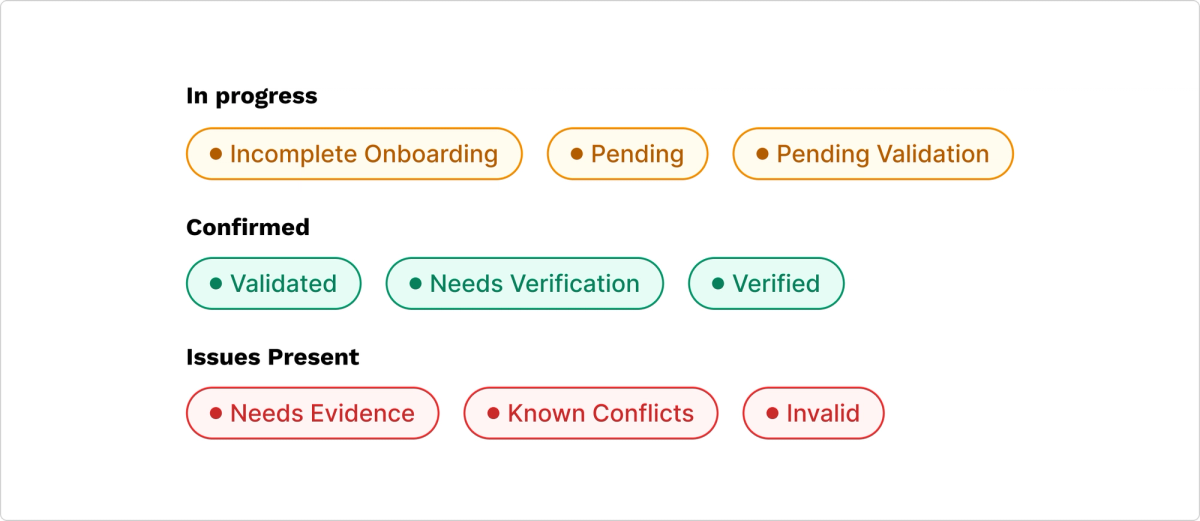
Incomplete Onboarding is the default status for all entities. Pending indicates the system has received entity data but minimum requirements haven't been met. Pending Validation means all necessary information has been provided and is awaiting review. Validated means the entity was successfully validated.
Disputes and Inconsistencies
Throughout the validation process, inconsistencies or issues may emerge. Needs Evidence means the provided information contains inconsistencies or does not match public records. Entities have 14 days to provide evidence before status changes to Invalid.
Known Conflicts commonly arises when duplicate entities exist under the same name and jurisdiction. Invalid indicates an entity has failed to meet the burden of proof for validation or verification requirements.
Verification
Needs Verification means verification has been requested for this entity. The standard timeline aims for verification within 5 business days.
Verified represents the highest level of scrutiny available on an entity. This badge demonstrates to partners that the organization is who it claims to be, allowing partners to rely on associated warnings and data.
More from the blog

Jul 29, 2026
How to Talk About Trade Compliance like a Leader in the Boardroom
How customs brokers and importers can make the business case and advocate for trade compliance to leadership, get buy-in, and stay ahead of enforcement.
Jul 8, 2026
Top 5 discussion topics from "19 CFR and AI" webinar with Cindy Allen and Hugo Pakula
Trade compliance is changing fast: AI adoption, tariff volatility, and the end of de minimis all hit within the same stretch of time, and CBP used that window to close the technology gap. On this webinar, Cindy and Hugo gave a clear, actionable plan for trade professionals to keep pace with change while maintaining responsible supervision and control.


©2026 Tru Identity, Inc. All rights reserved.